
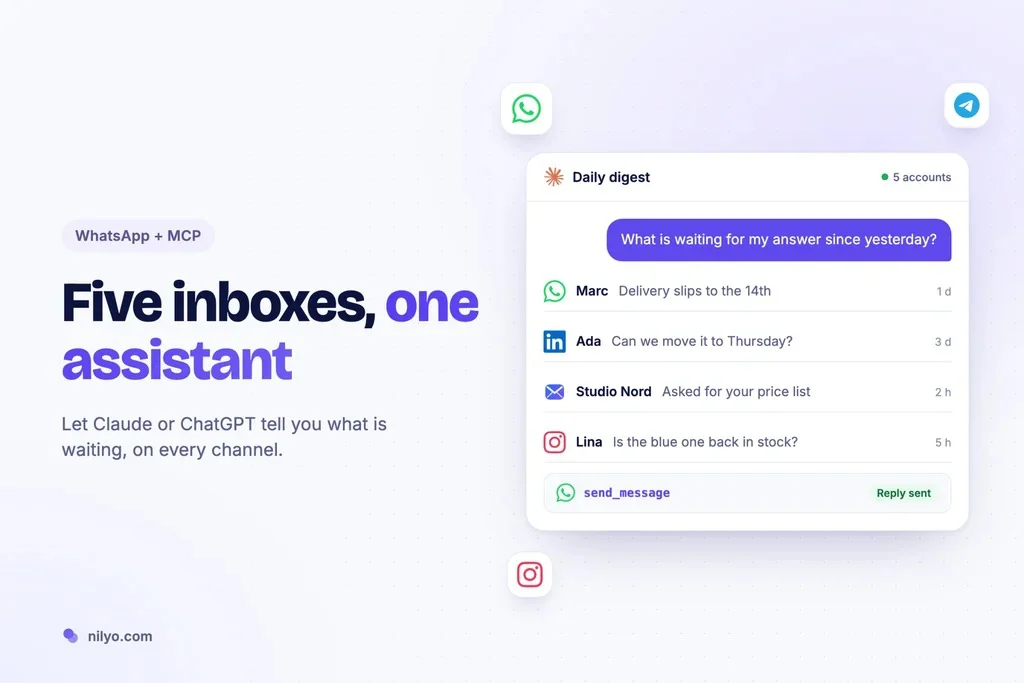
Client questions arrive on WhatsApp, partners write on LinkedIn, suppliers still send email, and a few contacts insist on Telegram. Each app has its own notifications and its own backlog, and important messages slip through the gaps between them. AI assistants can now read and answer messages through a standard called MCP. Here is how WhatsApp fits into that picture, and why the real win is treating all your inboxes as one.
Introduction
If you run a small business or a busy freelance practice, WhatsApp has probably become your most important inbox without anyone deciding it should. The good news is that AI assistants can now work with it directly, through WhatsApp MCP connectors offered by open source projects and by hosted services such as nilyo.com. The better news is that the same approach covers your other channels too, which is where most of the time savings are hiding.
## The problem is not WhatsApp, it is the gaps
Ask people why they miss messages and they rarely blame one app. They blame the switching. A voice note from a client on WhatsApp, a pricing question on Instagram, a meeting change by email: each message is easy to answer, but checking five places several times a day is exhausting, and the one you forget to check is always the one that mattered.
Search engines show the demand clearly. People look for “WhatsApp MCP for Claude,” “Claude WhatsApp connector” and “ChatGPT WhatsApp integration.” What they want is an assistant that can see their conversations and tell them what needs attention.
## What a WhatsApp MCP connector does
MCP, the Model Context Protocol, is an open standard that lets AI agents call external tools. A WhatsApp MCP connector exposes tools such as listing recent chats, reading a conversation, searching messages and sending a reply. Once it is connected, Claude or ChatGPT can use those tools when you ask something in plain language.
That means you can say “What did the supplier say about the delivery date?” and get an answer from the actual thread, instead of scrolling through your phone.
## Self hosted or hosted?
The open source route is popular with developers. Several projects let you link a personal number by scanning a QR code, then run a local server that Claude Desktop can talk to. They are free and flexible. They also come with honest warnings: you maintain the setup, you keep it running, and the project authors remind you that WhatsApp’s terms apply to how you use your account.
Hosted services take that maintenance off your plate. You link your number once on their side, and your assistant receives structured tools. The trade off is a subscription, in exchange for a connection that stays up and a security model you do not have to build yourself.
## The daily digest: the workflow worth starting with
The most useful thing you can ask an assistant connected to your messaging apps is not “send a message.” It is “tell me what I missed.” A good daily digest prompt looks like this:
“Go through my messages from the last 24 hours on WhatsApp, LinkedIn and email. List the ones that are waiting for my answer, sorted by urgency, with one line each.”
A connected assistant reads each channel, filters out noise such as group chatter and newsletters, and returns a short list. Five minutes with that list replaces an hour of opening apps. Run it once in the morning and once in the afternoon, and very little slips through.
From there, the natural next step is answering. “Reply to Marc that Thursday works, and ask Ada for her colleague’s email.” The assistant drafts both replies in the right threads and, in a well designed setup, shows them to you before sending.
## Why one connection beats five
You could connect a separate tool for each app. Many people start that way, then hit the limits quickly. Different setups, different permissions, and an assistant that cannot connect a WhatsApp conversation with the LinkedIn profile of the same person.
A single connection layer that covers WhatsApp, LinkedIn, Instagram, Telegram and email changes the questions you can ask:
• “Who wrote to me this week about the new catalog, on any channel?”
• “This lead messaged on LinkedIn. Continue the conversation on WhatsApp, since they shared their number.”
• “Before my call with Léa, summarize everything we exchanged, wherever it was.”
These cross channel questions are where an assistant stops being a writing aid and starts acting like a real coordinator.
## What to check before connecting your WhatsApp
Your WhatsApp holds personal and client conversations, so be strict:
• Credentials stay out of the model. The assistant should only receive tools and results.
• Access is revocable. One click should disconnect the agent without unlinking your phone.
• Writes are deliberate. The assistant reads the thread first and asks before sending.
• The infrastructure is audited. Look for SOC 2 Type II and GDPR commitments rather than vague promises.
• It works in your tools. Check support for the assistants and automation platforms you actually use, such as ChatGPT, Claude, n8n, Zapier or Make.
## Keep the human part human
An assistant connected to WhatsApp is excellent at the mechanics: finding, summarizing, drafting, reminding. It is not a replacement for the tone your clients know you for. Let it prepare the reply, then add the sentence only you would write. The goal is not to automate relationships, it is to stop losing them in the gaps between five apps.
Start with the daily digest for a week. If it catches even one message you would have missed, the setup has paid for itself.